
TL;DR:
Most GA4 eCommerce setups have hidden flaws: duplicated events, broken funnels, and inaccurate revenue. This guide outlines the most common issues and how to fix them through a structured GA4 audit.
Google Analytics 4 (GA4) introduces a flexible, event-driven model designed to support cross-platform measurement, improved privacy handling, and greater customization. However, if eCommerce tracking is not implemented carefully or key steps are missed, GA4 implementations often fall short of expectations due to a range of common—but critical—tracking issues.
Many eCommerce teams encounter inaccurate revenue reporting, flawed funnel analysis, and attribution inconsistencies without realizing that the root causes stem from gaps in GA4 configuration, GTM setup, platform integration, or data layer structure.
This article outlines the most frequent issues observed in eCommerce tracking implementations with GA4, explores their underlying causes, and provides practical recommendations for resolving them through structured auditing.
Duplicate page_view event tracking
The issue
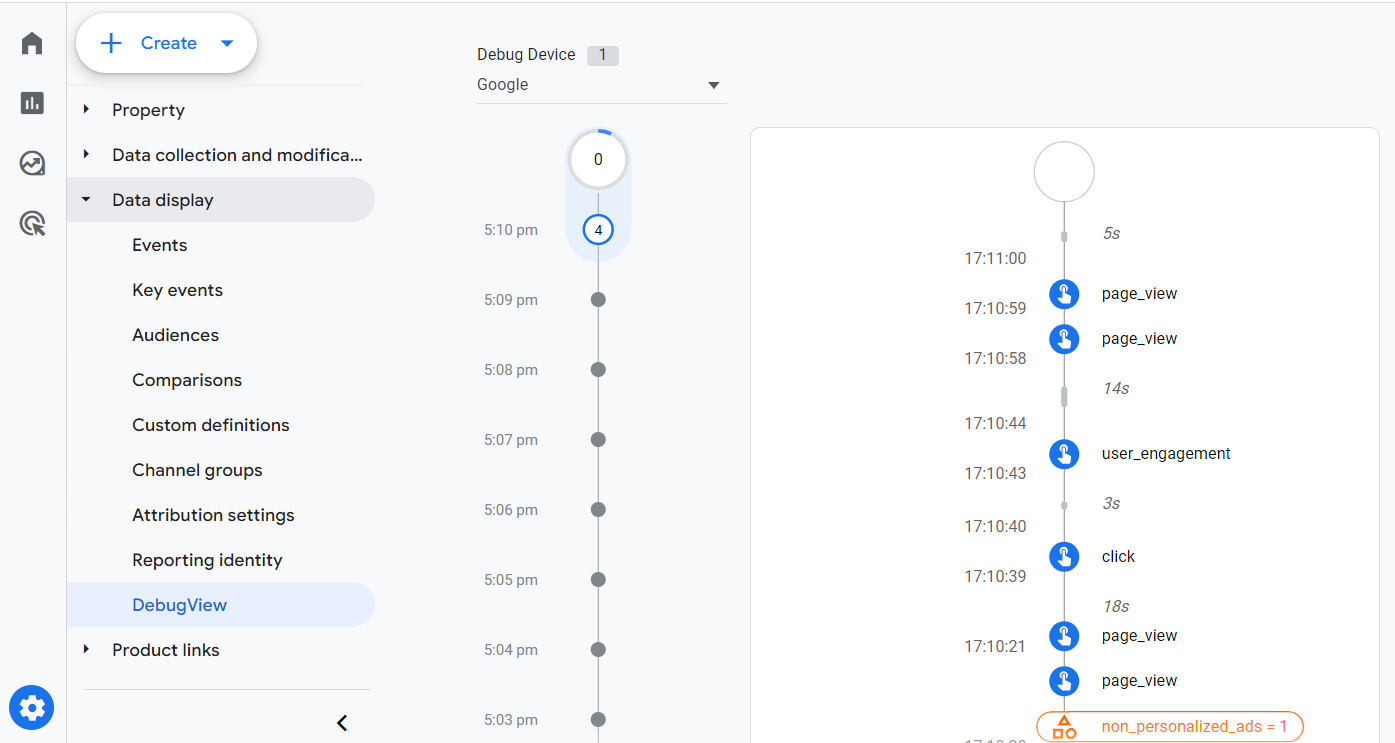
The page_view event—central to GA4’s session, engagement, and traffic flow metrics—is sometimes triggered multiple times per page load. This issue can occur independently or alongside other duplicated eCommerce events.
Impact
When page_view is duplicated, GA4 inflates the number of pages viewed per session, artificially increases session counts, and misrepresents metrics like bounce rate and average engagement time. This distorts funnel visualizations, path analysis, and user journey mapping, often leading to incorrect assumptions about user interest and behavior.
Common causes
- GA4 configuration tag firing page_view by default, alongside a custom page_view event in GTM
- Hardcoded gtag(‘event’, ‘page_view’) alongside GTM-based tags
- Page templates or apps with built-in tracking duplicating the event
- SPA frameworks using virtual pageviews without suppressing initial page load events
Recommended solution
Audit all GA4-related tags and templates to ensure that only one page_view is triggered per page load, unless virtual navigation is explicitly required. For SPAs or dynamic sites, implement clear logic to fire page_view only on virtual transitions, not on every state change. Avoid enabling both automatic and manual page_view events unless strictly controlled and intended.
Duplicate ecommerce event tracking
The issue
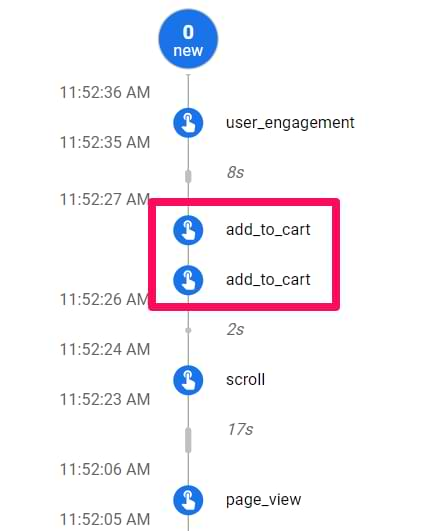
Events such as view_item, add_to_cart, and purchase may be fired more than once per user action.
Impact
Duplicate events result in inflated engagement and conversion metrics. For example, add_to_cart may appear to have a high frequency, leading analysts to believe that users are more engaged than they are. Duplicate purchase events can falsely increase revenue figures, complicating performance assessment across marketing campaigns.
Common causes
- Multiple GTM tags with overlapping triggers
- Redundant event logic across platform and tag manager
- Triggers firing during both load and interaction
Recommended solution
Limit each event to a clearly defined trigger with a deduplication condition (e.g., via a sessionStorage flag). Use DebugView to inspect actual firing behavior and make adjustments as necessary.
Inconsistent DataLayer parameters
The issue
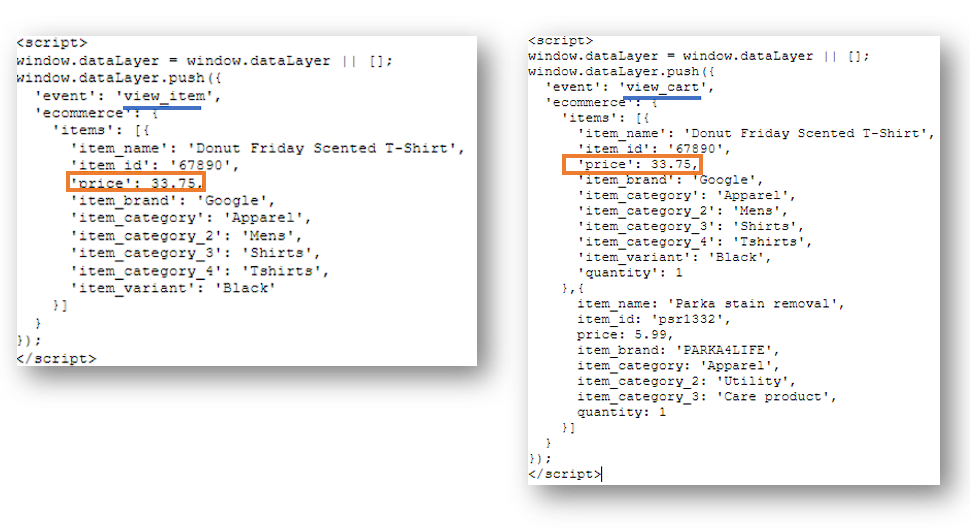
Event parameters (e.g., item ID, price, currency) differ in naming or format across eCommerce events.
Impact
GA4 cannot reliably match events throughout the funnel if identifiers or other critical parameters are inconsistent. This leads to inaccurate attribution of revenue to specific products, incomplete eCommerce reporting, and broken item-level insights in explorations.
Common causes
- Platform or theme inconsistencies
- Different third-party apps injecting conflicting data formats
- Asynchronous rendering causing undefined parameters
Recommended solution
Standardize the data layer format for all eCommerce events based on GA4’s Enhanced Ecommerce specification. Validate parameters using GTM’s variable preview and ensure naming consistency across page templates and scripts.
Incomplete event coverage
The issue
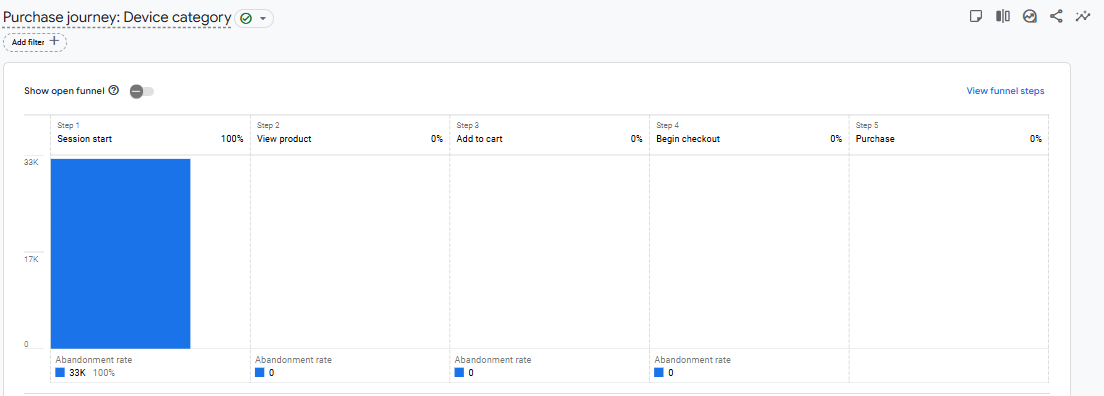
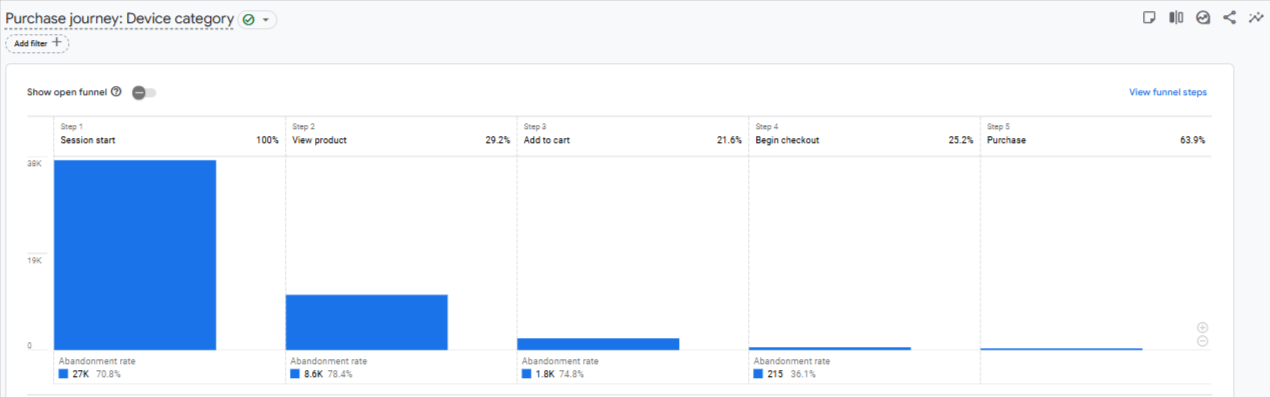
Not all expected eCommerce funnel events (e.g., begin_checkout, add_payment_info, purchase) are implemented or fired.
Impact
Funnel visualizations and pathing reports in GA4 appear broken or incomplete. This reduces visibility into where users drop off, making it difficult to optimize the checkout flow or analyze conversion barriers accurately.
Common causes
- Incomplete GTM configuration
- Missing or faulty DOM selectors
- Platform updates disabling GTM execution on specific templates
Recommended solution
Map out the full eCommerce journey and ensure all GA4-relevant events are implemented. Use test purchases in DebugView to confirm that each key interaction is captured in sequence.
Missing purchase events for specific payment methods
The issue
Purchases completed via specific gateways (e.g., PayPal, Afterpay) do not trigger the purchase event in GA4.
Impact
GA4 underreports revenue, causing attribution errors and misrepresenting campaign ROI. Payment methods with no tracking often show lower conversion rates, misleading performance analysis by segment.
Common causes
- Redirects that bypass tracked confirmation pages
- Lack of server-side tracking for webhook events
- Incomplete platform integration for third-party gateways
Recommended solution
Use backend signals (e.g., platform webhooks or order status callbacks) to trigger purchase events via the GA4 Measurement Protocol. Alternatively, ensure all gateways return users to a tracked confirmation page post-payment.
Session discontinuity across domains
The issue
Users crossing between domains (e.g., from store to checkout) are treated as new users in GA4.
Impact
Sessions are split, inflating user counts and breaking attribution. This affects funnel reporting and renders session-based dimensions and metrics unreliable.
Common causes
- Missing cross-domain linker plugin
- GA4 not configured for multi-domain tracking
- UTM parameters not passed across domains
Recommended solution
Enable cross-domain tracking in GTM or gtag.js with appropriate linker settings. Include all checkout and subdomains in the referral exclusion list within GA4 admin settings.
Attribution discrepancies and channel misclassification
The issue
Conversions are often attributed to “Direct” or “Unassigned” even when they originated from known sources.
Impact
Incorrect source/medium reporting misguides channel performance evaluations and can lead to misallocation of marketing budget.
Common causes
- Session loss (see previous section)
- UTM stripping during redirect
- Consent-related blocking of tracking
Recommended solution
Ensure campaign links are properly tagged and that UTM parameters persist through the full user journey. For sites using consent banners, implement GA4 Consent Mode and modelled conversions to recover visibility into blocked sessions.
Platform or UX issues that disrupt tracking
The issue
Site features like pop-ups, lazy-loaded elements, or JavaScript errors prevent tags from firing correctly.
Impact
Critical user actions—such as adding to cart or interacting with a product—may go untracked. GA4 reports then understate engagement and exclude significant interaction data from path or audience analysis.
Common causes
- Events bound to DOM elements that don’t yet exist
- Tag manager execution blocked by script errors
- Theme or plugin updates breaking existing selectors
Recommended solution
Use MutationObserver to detect dynamically inserted content. Test all eCommerce-related tags across different devices and browsers. Wrap custom scripts in error handling to avoid cascading failures.
Conducting a 360-degree audit of GA4 eCommerce tracking
The best way to prevent and correct the issues outlined above is through a structured and recurring analytics audit.
Key components of the audit
- GA4 property configurationValidate stream setup, event consistency, conversion goals, and attribution settings.
- GTM auditReview tag firing conditions, sequencing, and any overlapping or redundant tags.
- Data layer validationCheck parameter consistency across all eCommerce interactions and templates.
- Cross-domain testingSimulate journeys across multiple domains and verify session continuity.
- Platform-specific checksEnsure that the eCommerce platform emits the required data and supports complete event coverage.
- Consent and privacy complianceConfirm proper use of Consent Mode and fallback logic for blocked tracking.
- Attribution traceabilityTest UTM persistence and source/medium assignment across traffic channels.
- Error and debug monitoringIdentify failed or misfired tags using DebugView, console logs, and browser inspection tools.
Audit frequency
Audits should be performed quarterly and during key transition points—such as redesigns, payment gateway additions, or checkout process changes.
Accurate eCommerce tracking in GA4 is both essential and complex. While GA4 provides the tools to support comprehensive analytics, the responsibility lies in the implementation. Duplicate events, attribution issues, session splits, and missing data all degrade the quality of insights, leading to flawed decision-making.
Organizations should prioritize recurring 360-degree audits that span GA4, GTM, and platform-level configurations. By doing so, businesses can maintain data integrity, increase trust in analytics, and enable smarter, more profitable decision-making.